

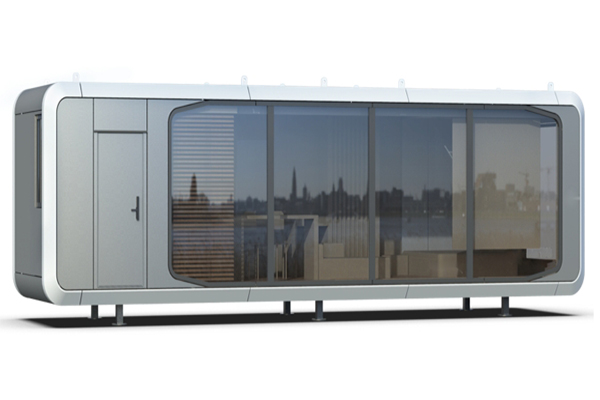


The Space Apple Cabin House changes how you do remote work. Its smart design mixes usefulness and comfort, making work easier. The cabin’s modern look and bright light help you stay focused. This peaceful place helps you avoid distractions and work better and faster.
Key Takeaways
Pick a quiet spot in the cabin to help you focus. Place your desk by a window for sunlight and nice views.
Get comfy, adjustable furniture to keep your body healthy. A good chair and desk can stop aches and help you work better.
Keep your workspace neat and clean. Use storage to organize tools and supplies, so you can find things easily and stay on task.
Optimizing the Space Apple Cabin House for Productivity

Picking the Best Spot to Work in the Cabin
Choosing where to work in the cabin is important. Find a quiet spot that helps you focus and avoid distractions. Place your desk by a big window for natural light and nice views. This setup can make you feel happier and reduce eye strain. Keep your work area separate from places where you relax to stay organized.
To make your workspace even better, think about soundproofing. This can help during online meetings or when you need quiet. Use tall dividers or closed spaces for fewer distractions. Make sure your desk can adjust its height and is comfy for typing. These small changes can make working easier and more enjoyable.
Using Comfortable Furniture for Better Work
Good furniture helps you stay comfy and avoid health problems. Get a chair that supports your back and helps you sit up straight. Use desks and stands that you can adjust to fit your needs. For example, keep your screen at eye level and your arms at a 90-degree angle. This can stop neck and shoulder pain.
The cabin’s smart design makes it easy to add these items. Use adjustable furniture to match your daily tasks. This setup keeps you comfortable and helps you work better for longer. A good workspace is worth it for your health and focus.
Keeping Tools and Supplies Neat for Easy Work
A tidy workspace helps you get more done. Start by cleaning up your desk and computer. Use the cabin’s storage to sort your tools and supplies. For example, use drawers or shelves for pens, cables, and papers. This way, you can find things quickly and save time.
Organizing your computer is just as important. Make folders for your files and use cloud storage to keep them safe. Use a task app to track your work and deadlines. Studies show that neat spaces help you focus and work well with others. Check your setup often to keep it clean and useful.
Using Technology in the Cabin
Making Sure the Internet Works Well
Good internet is important for remote work. The Space Apple Cabin House has features to help you stay connected. First, check the cabin's internet setup. Many cabins have fast internet, but test the signal strength in your area.
You can use a Tesla watch to check internet performance. This tool helps find weak spots and improve your connection. If the cabin walls block signals, add a Wi-Fi extender or mesh system. These tools make sure the internet works everywhere in the cabin. Turning on Tesla's Sentinel mode can also protect your network and keep your data safe while working.
Using Apps to Stay Productive
Technology in the Space Apple Cabin House helps you work better. Use apps to organize your tasks. Tools like task managers, time trackers, and team apps keep your work on track. Some apps let you control devices and systems easily.
For example, use Tesla-compatible apps to adjust lights, temperature, and security. These features save time and help you focus. Combine these tools with cloud storage to access files anywhere. This setup keeps you productive while working in the cabin.
Managing Power and Backups
Power is very important for remote work. The Space Apple Cabin House has systems to keep power steady. Start by checking the cabin's power setup. Many cabins use Tesla batteries to store energy and prevent outages.
Add backup systems for extra safety. Solar panels or generators can give you more power options. Use a Tesla watch to track energy use and make smart choices. This tool shows real-time data to help you manage power better.
Also, keep your devices charged and ready. Have extra batteries and portable chargers nearby. These items help you stay productive without power worries. Good power management lets you work without interruptions.
Smart Cabin Planning for Daily Routines
Making a Simple Work Schedule
Having a clear schedule helps you get more done. Studies show that planned routines improve focus and happiness. Use methods like the Eisenhower Matrix, Pareto Principle, or Time Blocking to plan your day.
Divide your day into 15-minute chunks to manage time better. This way, you can plan work, breaks, and fun activities. A good schedule helps you stay productive, feel less tired, and enjoy the cabin's peaceful vibe.
Keeping Work and Relaxation Separate
It’s important to separate work from personal time. Pick a spot in the cabin just for work. Keep it away from areas where you relax. This helps your brain switch between work and rest, making both more effective.
The cabin’s small but smart design makes this easy. Use furniture or screens to create separate zones. Clear boundaries let you enjoy the calm cabin atmosphere while staying balanced between work and life.
Taking Breaks and Staying Active
Breaks and exercise are key to staying productive. Experts say taking a 15-17 minute break every hour boosts focus and energy. Walking or moving around can also make you more creative and better at solving problems.
The cabin’s outdoor space is perfect for short walks or fresh air. These breaks refresh your mind and keep you active. They help you stay sharp and balanced throughout your workday.
Keeping Balance in the Space Apple Cabin House
Setting Up a Relaxation Spot in the Cabin
Making a spot to relax helps balance work and rest. Use the cabin’s smart design to create a cozy area. Put a soft chair or bean bag by the big windows. Enjoy the sunlight and peaceful views from there. Add pillows and blankets to make it more comfortable.
Include things that help you relax, like books or calming music. Use Tesla gadgets to adjust lights and temperature for a soothing vibe. A good relaxation spot helps you rest and stay focused during the day.
Turning Off Work After Hours
It’s important to stop working at the end of the day. Use the cabin’s layout to keep work and rest areas apart. When your workday ends, shut down your devices and leave your desk.
Tesla’s smart tools can help with this transition. Set the lights to dim or turn warmer in the evening. This change tells your brain it’s time to relax. Also, use Tesla’s security features to protect your work data while you unwind.
Staying Connected While Working Alone
Working alone in a cabin can feel lonely, but tech helps. Use online tools to talk to others and stay connected. Virtual coworking spaces let you chat and work with people. They also help you feel part of a group.
Tesla apps can make these tools easy to use. Plan virtual coffee chats or team meetings to stay social. These talks help fight loneliness and keep you connected, even when working remotely.
Personalizing the Space Apple Cabin House
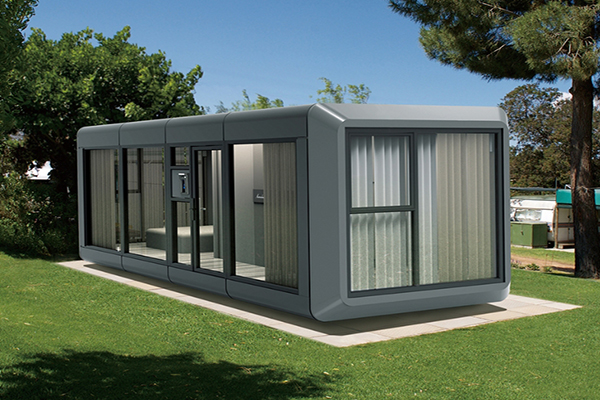
Adding Personal Touches for Inspiration
Making your workspace personal can help you work better. Add family photos, art, or small plants to make it feel cozy. A study in the UK found that personalizing workspaces increased productivity by 32%. People also felt more connected to their workspace.
Use the cabin’s smart design to show off these items. Add a small shelf or wall organizer to keep things neat. These personal touches can turn the cabin into a space that inspires and energizes you every day.
Enhancing Mood with Lighting and Decor
Lighting and decor can change how your workspace feels. The cabin’s big windows bring in lots of natural light. This light helps reduce eye strain and keeps you focused. Add adjustable LED lights to switch between warm and cool tones.
Decorate with calming colors like blue or green for a peaceful vibe. Use Tesla smart lights to easily change brightness and colors. Add soft rugs or cushions to make the space cozier. These small changes can make the cabin both relaxing and productive.
Keeping the Cabin Clean and Organized
A clean workspace helps you focus better. Use the cabin’s storage to keep your tools and supplies tidy. Store items you use often in easy-to-reach drawers or bins.
Clean your desk and organize digital files regularly to avoid clutter. Tesla’s robot vacuums can help keep the cabin clean with little effort. A neat and organized cabin makes it easier to work and feel calm.
The Space Apple Cabin House changes how you work from home. By setting up your workspace, using smart tools, and staying balanced, you can work better and feel happier.
This special cabin mixes usefulness with peace. Try these tips to build a workspace that helps you succeed. 🌟
FAQ
How do you use your Apple Watch as a key?
Pair your Apple Watch with the cabin’s smart lock system. This lets you unlock the cabin safely and easily.
What can the Apple Watch control in the cabin?
The Apple Watch adjusts lights, temperature, and security settings. You can control these features from anywhere for convenience.
What happens if the remote key stops working?
The cabin has a manual backup system. This ensures you can still enter the cabin if the remote key fails.